Demon mode, element by element
Published 21 October 2026
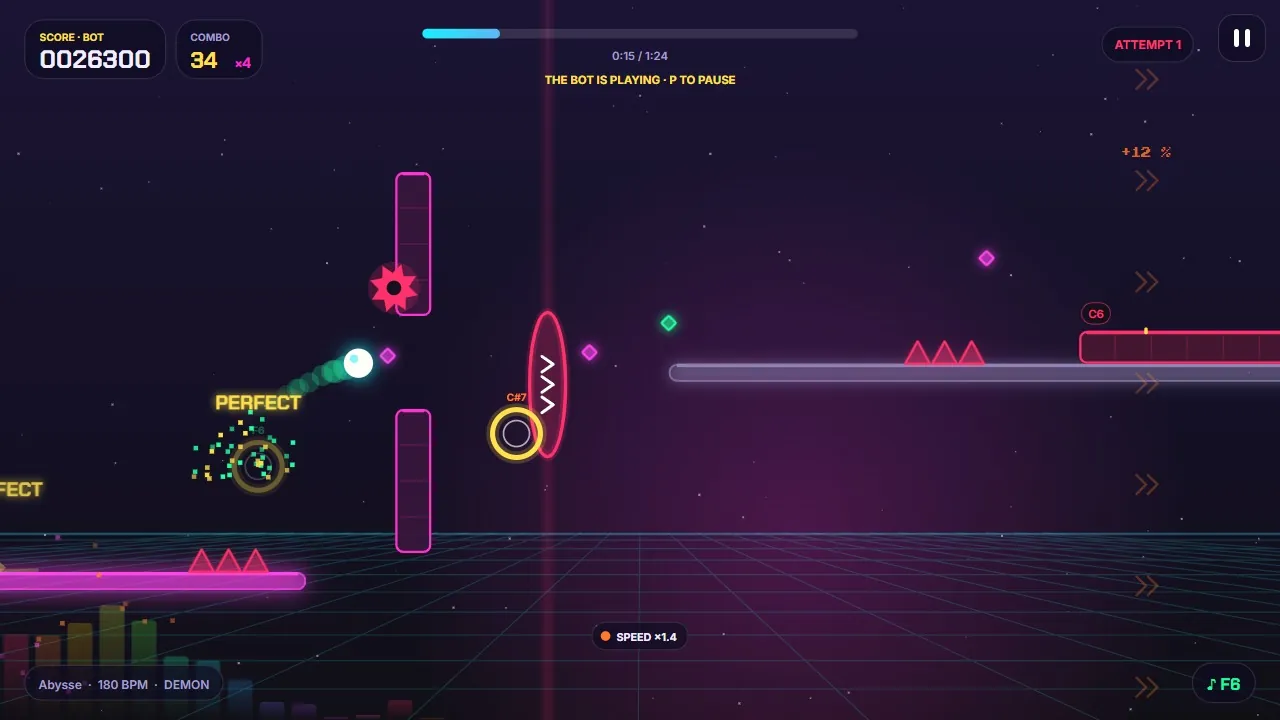
Demon is Rythmo Bille's most demanding difficulty, inspired by Geometry Dash. The melody stays at the centre: every note is still a platform or an element to touch right on time. But the path fills up with obstacles, pads, rings and portals, and you only have one life.
One life, and a practice mode
On Demon, the slightest mistake sends you back to the start of the level: the counter shows ATTEMPT 2, 3… and the percentage you reached. With the “Infinite lives” option, Demon becomes practice: after a fall, the run resumes from the last landing. It's the best way to learn a level piece by piece.
The dynamic camera looks ahead and zooms out when a passage is too high or too low to fit on screen. You can turn it off in the options to keep a fixed camera that only follows the ball.
Every Demon level generated by the game is checked: the bot finishes it with PERFECTs, collecting every bonus note. If a passage looks impossible, watch the bot: there is always a way.
Blocks and obstacles
| Element | What it does | How to play it |
|---|---|---|
| Block | A solid block. You can land on it, you bump your head from below, and running into its side makes you lose. | Jump early enough to clear it, or stay low if it's up in the air. |
| Note block | A block in a note's colour: land on it to play the note, like a platform. | Aim for its yellow mark, like a platform. |
| Sitting note block | A note block sitting on the platform. | A small hop to get on top. Without jumping, you run into it. |
| Gap | Two blocks with a hole between them. | Jump at the right moment to go through the hole — not too early, not too high. |
| Ceiling spikes | Spikes hanging under a block. | A short tap passes underneath; a jump that's too high hits them. |
| Saw | A spinning saw, often above a jump. | Don't go too high: release earlier. |
| Catch platform | A grey surface without a note that catches the ball, for example after a series of rings. | Let it carry you: it asks nothing. |
Pads
A pad sits on a surface: it acts by itself when the ball rolls over it, without pressing.
- Yellow pad: an automatic big jump.
- Pink pad: an automatic small jump.
- Blue pad: flips gravity. If it was pulling down, the ball falls upward and rolls under the platform above; if it was already flipped, the ball comes back down.
Tip: don't jump just before a pad. The pad does the work; a jump of yours would carry you over it.
Rings
A ring floats in the air and does nothing by itself. To use it, press while the ball is inside it. Without a press, the ball passes through with no effect.
- Yellow ring: the ball shoots up again in mid-air, like a new jump.
- Pink ring: a small jump in mid-air.
- Blue ring: gravity flips (or returns to normal if it was already flipped).
- Purple ring: the ball dives straight down.
- Note ring: a ring that carries a note. Press while the ball is inside, right on time, to play it: it is judged like a platform.
Portals
The ball must go through a portal for it to act. The exceptions are the portals that get in your way (fixed jump, heavy ball, mirror) and speed portals: they act even if the ball passes beside them, so you can't dodge them.
| Family | Portals | Effect |
|---|---|---|
| Gravity | ↑ flipped, ↓ normal | The world turns over: the ball rolls on the ceiling, then falls back with the normal portal. |
| Speed | ×0.7, ×1, ×1.3, ×1.6 | The world slows down or speeds up. The music's rhythm doesn't change. |
| Mirror | on, normal | The world scrolls from right to left, then back to normal. |
| Jump | fixed, free | With a fixed jump, holding no longer goes higher: only timing matters. The free portal restores the normal jump. |
| Ball weight | light, normal, heavy | Light, the ball rises higher and falls slowly; heavy, its jumps are lower and shorter and it falls fast. |
The most confusing is flipped gravity: the move is exactly the same (press to “jump”), but the ball goes downward. Work on it separately with practice mode (Play menu, Practice card): start just before it, loop the section and slow it down before chaining it.
Path elements and traps
A pad, ring or portal on the level's path earns 150 points × your multiplier when you take it. Missing it costs those points and breaks your combo: a perfect score is then out of reach.
In levels made with the editor, a pad, ring or portal can instead be marked as a trap (“Must not be touched”): an element you should not take. Avoiding it earns a bonus, shown as “TRAP AVOIDED”.
Where to start
- Circuit Rubis (Hard reference): blocks, pads, rings, portals and saws, at a moderate tempo.
- Tempête Pourpre (Extreme reference): changing gravity and speed.
- Abysse (Demon reference): every element, at 180 BPM.
In the game, the “Game elements” guide (menu or editor) shows every element with a short animation played with the game's real physics, and the Game elements page gathers them all with a tip for each. And you can build your own Demon levels: every element has its tool in the editor.